
Thursday, February 27, 2014
Fighter Jet Concept
More goofing off with my tablet, this time with Gimp instead of Krita, the pressure sensitivity doesn't work on Krita, so it's nice to have it functioning in Gimp.

Tuesday, February 25, 2014
New Free Spaceship Sprite Faction
Just uploaded a new faction of spaceship designs for use in your games and such, available on the free sprites page, with normal maps.


Thursday, February 20, 2014
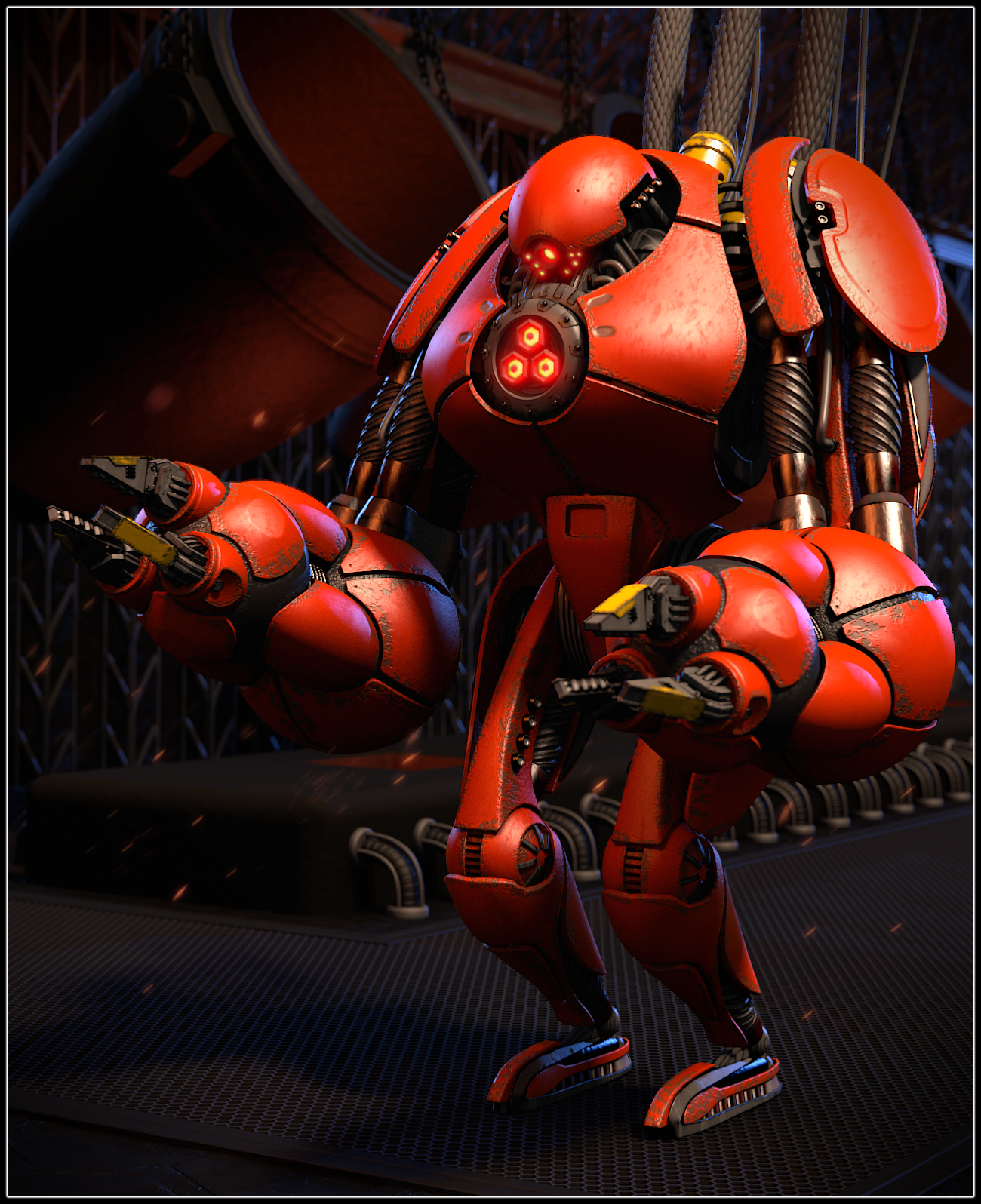
Big Robot
Been working on a somewhat bigger project the last couple weeks or so, a large robot that works in some metal-related factory.
On render, the scene has about one million polys. Did a little post-pro editing in Gimp, icluding adding the sparks.
Wednesday, February 12, 2014
Second Alien Planet Krita Scene
Did another quick drawing out of boredom today, a drawing of an alien colony, with a cliche, generic space laser beam, because, why not?

Saturday, February 8, 2014
Krita Alien Planet Scene
Here's a quick Krita doodle, thought I'd take a break from my original projects today and do something on Krita, some alien planet scene, maybe some spaceship exiting a very spiky cave.

Thursday, February 6, 2014
Krita Top Down Spaceship Tutorial
Here's a quick little tutorial on how to do a basic-ish top-down spacecraft using Krita. The instructions are kind of basic so it may be possible to follow along using other software.
Step 1:
 First, create the basic shapes of your spaceships in black, for this I find the "sketch_ink" brush to be quite useful for this as it automatically helps fill in the center as you draw.
Don't forget to turn "Horizontal Mirror Mode" on before you begin, it's a small button in the upper, right hand corner.
It takes a bit of trial and error to find a good starting point for a spaceship design, but once you have a part you like, base the rest of the spaceship off it. For instance,if you've drawn a wing you like, add various parts until you have a complete spaceship.
When you are designing the basic shape of your spaceship, don't be afraid to use cntrl+z, a lot.
Step 2:

Now use a light grey color and the same "sketch_ink" brush on a new layer (Press the "Insert" key to add a new layer and move it below your current layer by clicking and dragging in the layers area).
Use the light grey brush to connect the black parts of your spaceship.
Step 3:

Now use a somewhat darker grey brush to add some detail to your light grey layer.
Step 4:
Create a new layer by pressing the "Insert" key and move it above all your existing layers. Choose what colors you are going to use for your image, you may want to use contrasting colors or complimentary colors, but if you want to play it safe, use only one main color. I have chosen orange for this example.

Next decorate your black layer with interesting sci-fi type shapes that go with the shapes you have chosen for your black layer. Try to keep them the same type of shapes as your black layer, if your black layer has a lot of sharp edges, do likewise with your colored layer.
Step 5:

If you have only chosen one color like I have here, add some more details on top of your colored areas with a lighter or darker version of the color you chose.
Step 6:

Add yet another layer and move it to the top of all your layers, turn off horizontal mirror mode and draw a little shine on the cockpit area of your spacecraft to differentiate it from the rest of your spacecraft. You may use the same "sketch_ink" brush as I have done here.
And there you have it. For this tutorial the spaceship was pretty basic so you get the main technique down, but freel free to get creative, go crazy with detail, shapes, colors and shading! I hope this tutorial has helped you, thanks for reading!
Step 1:
Don't forget to turn "Horizontal Mirror Mode" on before you begin, it's a small button in the upper, right hand corner.
It takes a bit of trial and error to find a good starting point for a spaceship design, but once you have a part you like, base the rest of the spaceship off it. For instance,if you've drawn a wing you like, add various parts until you have a complete spaceship.
When you are designing the basic shape of your spaceship, don't be afraid to use cntrl+z, a lot.
Step 2:
Now use a light grey color and the same "sketch_ink" brush on a new layer (Press the "Insert" key to add a new layer and move it below your current layer by clicking and dragging in the layers area).
Use the light grey brush to connect the black parts of your spaceship.
Step 3:
Now use a somewhat darker grey brush to add some detail to your light grey layer.
Step 4:
Create a new layer by pressing the "Insert" key and move it above all your existing layers. Choose what colors you are going to use for your image, you may want to use contrasting colors or complimentary colors, but if you want to play it safe, use only one main color. I have chosen orange for this example.
Next decorate your black layer with interesting sci-fi type shapes that go with the shapes you have chosen for your black layer. Try to keep them the same type of shapes as your black layer, if your black layer has a lot of sharp edges, do likewise with your colored layer.
Step 5:
If you have only chosen one color like I have here, add some more details on top of your colored areas with a lighter or darker version of the color you chose.
Step 6:
Add yet another layer and move it to the top of all your layers, turn off horizontal mirror mode and draw a little shine on the cockpit area of your spacecraft to differentiate it from the rest of your spacecraft. You may use the same "sketch_ink" brush as I have done here.
And there you have it. For this tutorial the spaceship was pretty basic so you get the main technique down, but freel free to get creative, go crazy with detail, shapes, colors and shading! I hope this tutorial has helped you, thanks for reading!
Wednesday, February 5, 2014
New Free Spirites - Top-Down Ships
There have been new sprites added to the free sprites page, three ships inspired by ancient times, enjoy!


Tuesday, January 28, 2014
WIP Game Screenshots


Wednesday, January 22, 2014
New Free Planet Sprites
Created a couple planet images for use in a small game I'm working on, thought I'd post them here for people to use, they are on the free sprites page:


Friday, January 17, 2014
Concept Car

Today I did a little for-fun concept car, it took a few tries, but it still needs a little polishing and the rear of the car looks like garbage, but this is my favorite concept car attempt so far. Although it does kind of remind me of a few cars already in existence.
It's a low poly car, at around 2K polys in its current state, not including the tires.
Subscribe to:
Posts (Atom)